Proxy Usage Guide
This document explains the proxy connection parameters, account format, IP allocation logic, and protocol usage, to help you correctly configure and use the proxy service.
1. Connection Parameters
A proxy connection uses the following 4 parameters: Host, Port, Username, and Password.
They are used to determine:
- The relay server to connect to
- The region of the exit IP
- Whether to keep the session IP persistent
- Whether account authentication succeeds
1. Host
Host refers to the address of the proxy relay server you want to connect to.
Currently available relay servers:
us.nexip.cc: US relay nodesg.nexip.cc: Singapore relay node
It is recommended to choose a relay server close to your target exit region for more stable connection quality and lower latency.
2. Port
Port refers to the proxy port listened to by the relay server.
After the client connects to the specified Host:Port, the system will assign the corresponding exit IP based on the account parameters.
2. Proxy Account Format
Proxy accounts support two modes:
- Sticky IP
- Rotating IP
1. Sticky IP Account Format
Illustration:
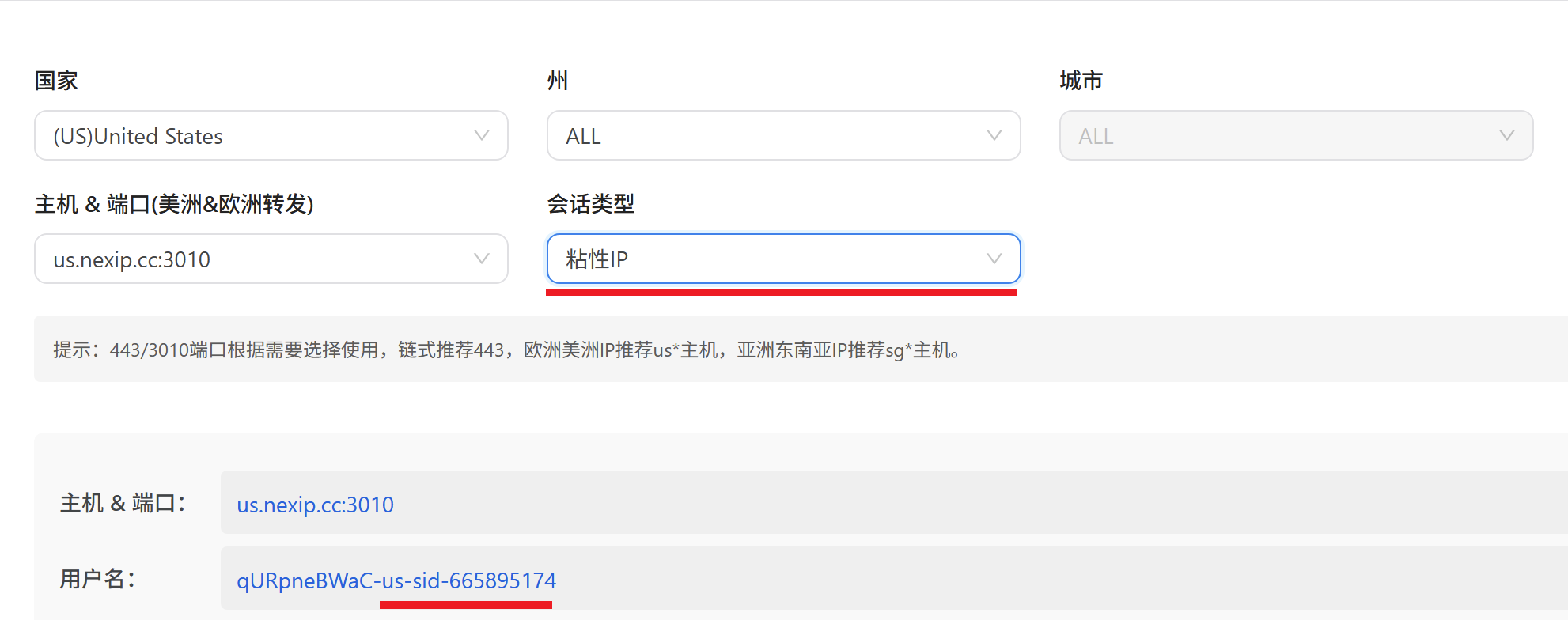
Description
sidstands for session identifier, used to keep the same exit IP as much as possible during the same session.- If
sidis not included, the system will usually treat subsequent requests as a new session and may assign a new IP. - Requests with the same
sidwill preferentially reuse the same proxy IP. sidsupports random strings from1to99999999.- For residential requests, the maximum sticky duration of a
sidis usually up to 30 minutes.
Example
curl -x http://username-us-sid-44575:[email protected]:443 "myip.ipip.net"Explanation:
- The
44575in the example above is only a sample value; you can replace it with any custom session identifier. - If you want the same batch of requests to use the same IP as much as possible, always keep the
sidconsistent.
2. Rotating IP Account Format
Illustration:
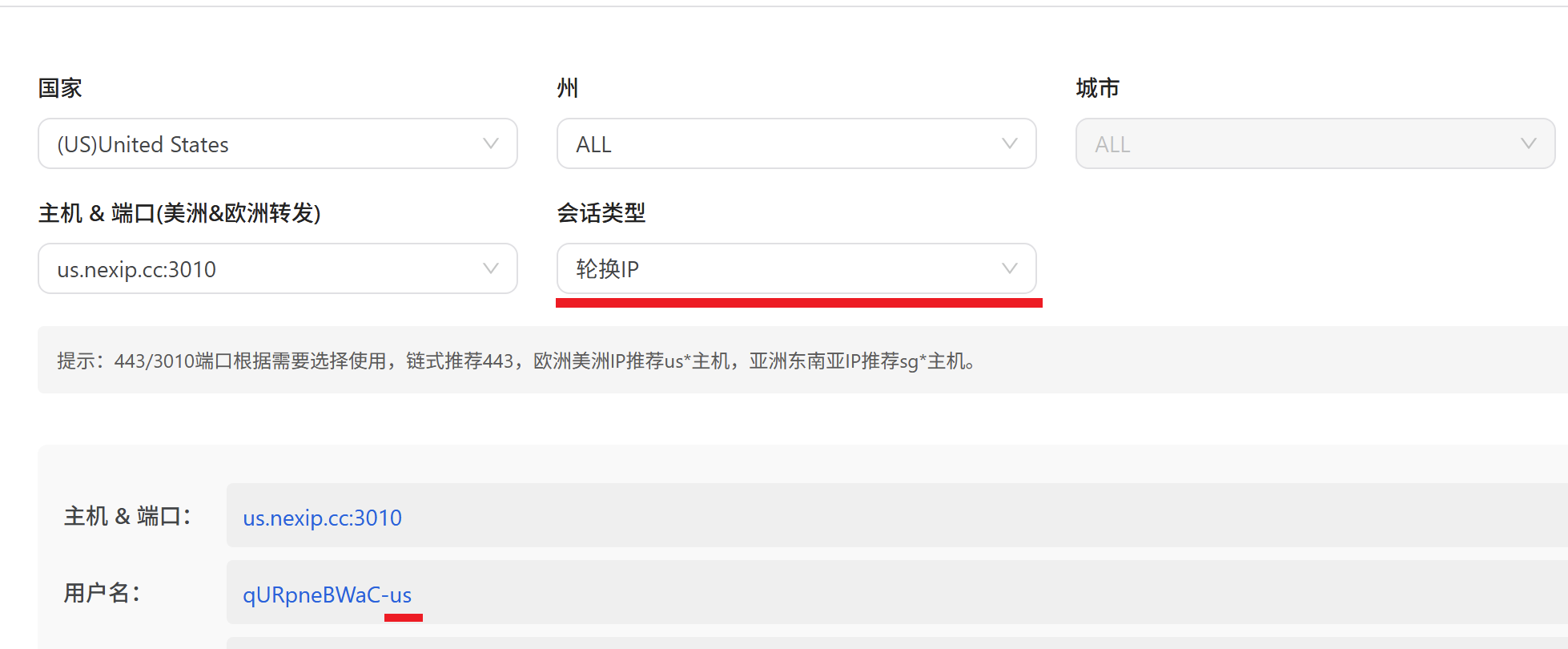
Description
- In Rotating IP mode, the system will automatically assign a new exit IP for each new request.
- If you need to specify a country or region, you can replace the country code in the account with the corresponding two-letter ISO country code.
- If no specific country is required, you can usually use the default region parameter, such as
any.
Country Example
curl -x http://username-nl:[email protected]:443 "myip.ipip.net"The example above requests a Netherlands exit IP.
City Example
If you need to further target a specific city, you can add a city parameter to the account, for example Amsterdam:
curl -x http://username_sc-nl_amsterdam:[email protected]:443 "myip.ipip.net"Additional Notes
- You can also specify a US state or city according to the same rules.
- For country codes, please refer to
ISO 3166-1 country codes.
3. Supported Proxy Protocols
The following protocols are currently supported:
- HTTP
- HTTPS
- SOCKS5
1. HTTP
Most examples in this document use the HTTP proxy format by default. HTTP has the best compatibility and is supported by most programs, scripts, and third-party tools.
Example:
curl -x http://username-any:[email protected]:443 "myip.ipip.net"2. HTTPS
If you want the connection between the client and the proxy gateway to also be encrypted, you can use the HTTPS proxy format.
Example:
curl -x https://username-any:[email protected]:443 "myip.ipip.net"Note: Some programming language libraries or third-party tools do not support HTTPS proxies. Please refer to the actual capabilities of your software.
3. SOCKS5
If you need to use the SOCKS5 protocol, please use socks5h:// or the corresponding SOCKS5 configuration method.
Example:
curl -x socks5h://username-any:[email protected]:443 "myip.ipip.net"Note:
socks5h://means that DNS resolution is performed by the proxy side.- Some websites may be more likely to detect proxy behavior when using SOCKS5, which falls under the target website’s own risk-control strategy.
4. Usage Recommendations
- If you need to maintain login status, shopping carts, or session continuity, prioritize using Sticky IP.
- If you need high-frequency scraping, batch requests, or continuously changing exit IPs, prioritize using Rotating IP.
- Choose a relay node as close as possible to the target exit region.
- Before formal integration, it is recommended to first use
curlor browser fingerprint detection websites to verify the IP, effective region, and session persistence behavior.